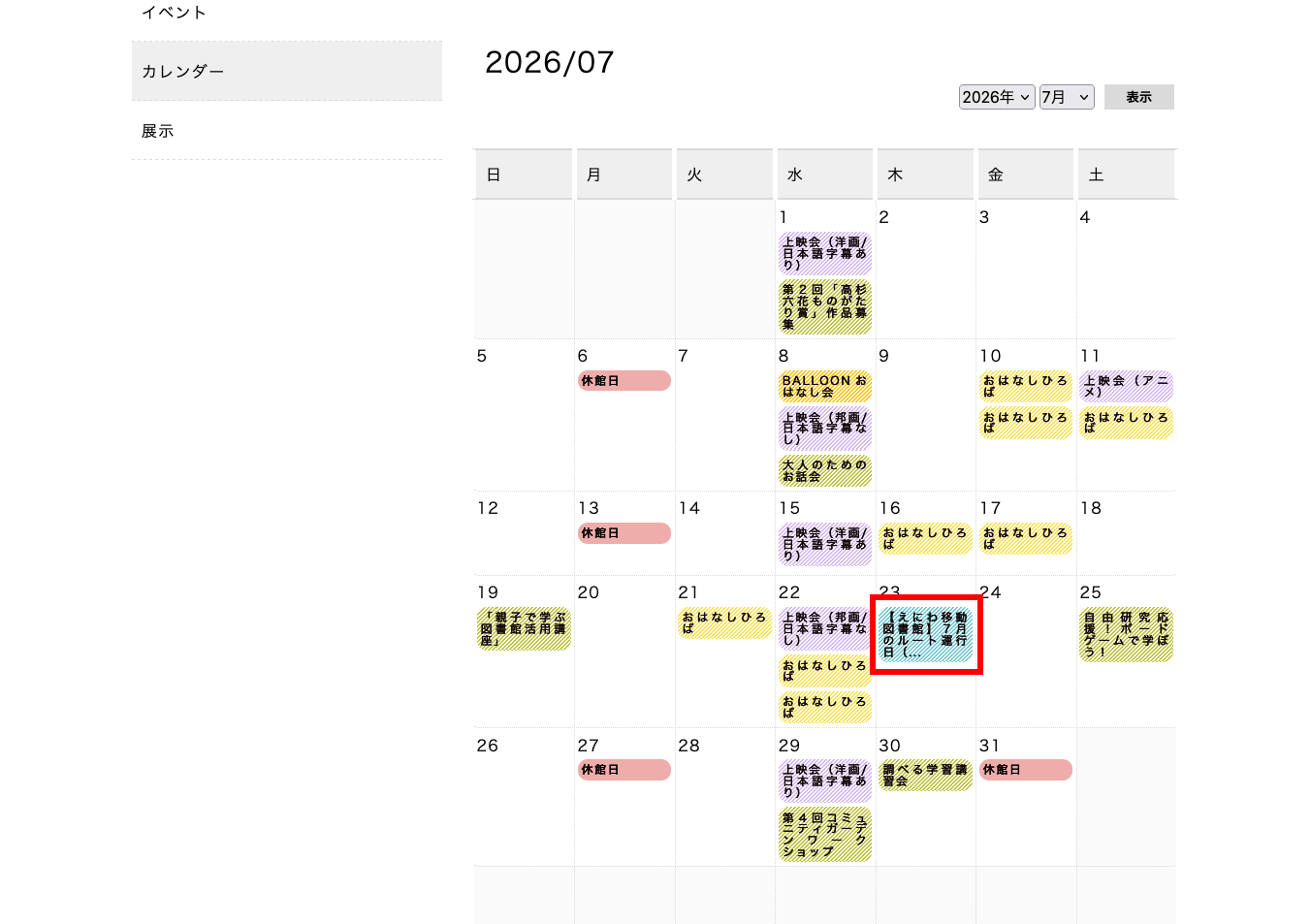
イベントカレンダーへの表示について
1. 先方が新規追加したカテゴリーのスラッグ名を英文字に変更
functions.php の 179行目の以下をコメントアウトし、管理画面上 イベントカテゴリー を表示させる。
unset($submenu['edit.php?post_type=event'][16]); // イベントカテゴリー
今回は 移動図書館 のスラッグ名を mobile-library に変更しました。
2. ショートコード内にある投稿の取得条件を調整
同ファイルの 738行目の投稿取得条件のタームリストに、上記変更したスラッグ名を追加。
// イベントカレンダーを表示する
add_shortcode('eventcalendar', 'shortcode_eventcalendar');
function shortcode_eventcalendar($params = array())
{
  // パラメータを取得する
  extract(shortcode_atts(array('ym' => null), $params));
  //年月日を取得する
  if (isset($_POST['select_y']) && $_POST['select_y'] != '' && isset($_POST['select_m']) && $_POST['select_m'] != '') {
    $current_year  = $_POST['select_y'];
    $current_month =   $_POST['select_m'];
    //初期値は当月
  } else {
    $current_year = date_i18n('Y');
    $current_month =   date_i18n('m');
  }
  $current_day = date_i18n('d');
  //$calendar_ym = ($params['ym']) ? $params['ym'] : $current_year. '/' . $current_month;
  $calendar_ym = $current_year . '/' . $current_month;
  //月のイベントを取得する
  $args = array(
    'post_type' => 'event', // 投稿タイプを指定
    'post_status' => 'publish',
    'posts_per_page' => -1,
    'meta_key' => 'cf_starttime',
    'order' => 'ASC',
    'tax_query' => array(
      array(
        'taxonomy' => 'eventcategory',
        'field' => 'slug',
        'terms' => array('balloon', 'ohanashi', 'eventinfo', 'closed', 'cinema01', 'cinema02', 'mobile-library') // ← ここに追加
      )
    ),
    'meta_query' => array(
      array(
        'key' => 'cf_startdate',
        'value' => $calendar_ym,
        'compare' => 'LIKE'
      )
    )
  );

  //略
}
3. 背景色を追加
layout.css の 1393行目の下に新規追加したカテゴリーの色を追加。
/* child_カレンダー_イベント設定 */
.closed {
  background: #eeacaa;
}
.ohanashi {
  background: linear-gradient(-45deg, #fff 25%, #fbe251 25%, #fbe251 50%, #fff 50%, #fff 75%, #fbe251 75%, #fbe251);
  background-size: 4px 4px;
}
.balloon {
  background: #ffc408;
  background: linear-gradient(-45deg, #fff 25%, #ffc408 25%, #ffc408 50%, #fff 50%, #fff 75%, #ffc408 75%, #ffc408);
  background-size: 4px 4px;
}
.eventinfo {
  background: #ddd23b;
  background: linear-gradient(-45deg, #fff 25%, #bec23f 25%, #bec23f 50%, #fff 50%, #fff 75%, #bec23f 75%, #bec23f);
  background-size: 4px 4px;
}
.cinema01,
.cinema02 {
  background: linear-gradient(-45deg, #fff 25%, #d5b7f1 25%, #d5b7f1 50%, #fff 50%, #fff 75%, #d5b7f1 75%, #d5b7f1);
  background-size: 4px 4px;
}
/* ここから追加 */
.mobile-library {
  background: linear-gradient(-45deg, #fff 25%, #72c7d4 25%, #72c7d4 50%, #fff 50%, #fff 75%, #72c7d4 75%, #72c7d4);
  background-size: 4px 4px;
}
/* ここまで追加 */
色は ChatGPT に作ってもらいました。